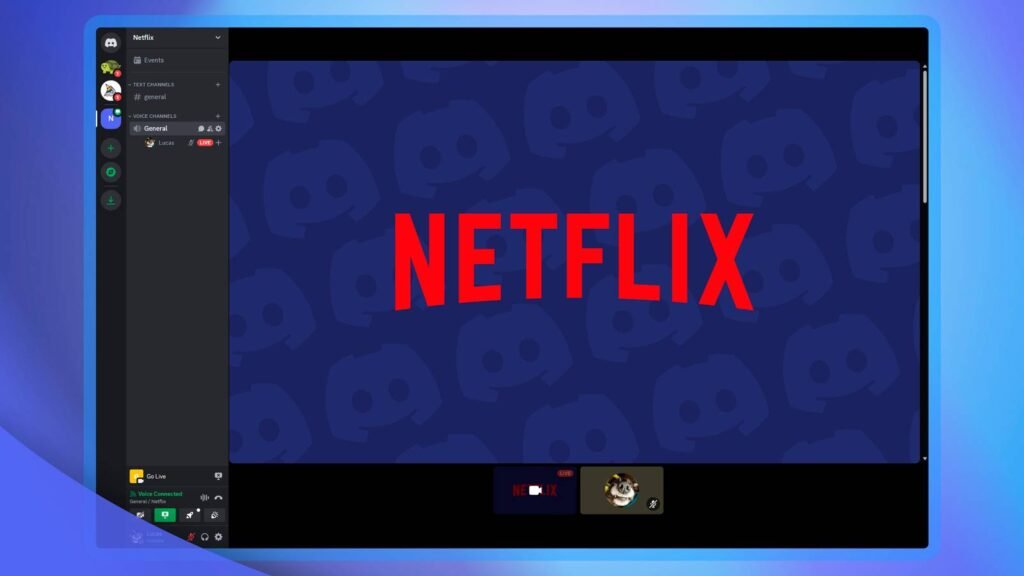
Watching movies and TV shows with friends is more fun when everyone can react together, and Discord makes that possible through its screen-sharing and Go Live features. That is why many users search for how to stream Netflix on Discord or how to watch Netflix with friends through a Discord voice channel.
Discord officially supports sharing an application window or an entire screen through its desktop client. However, Netflix uses content-protection technology that can cause the video to appear as a black screen when you try to share it. Netflix also has its own troubleshooting guidance for black-screen and content-protection problems.
This guide explains how Discord screen sharing works, how to set up a Netflix watch party, why the Netflix Discord black screen problem happens, and what legitimate alternatives you can use if Netflix does not display correctly.
How do you stream Netflix on Discord?
To stream an application through Discord, join a Discord voice channel, select the Screen Share or streaming option, choose the application window or screen you want to share, and select Go Live. Discord officially supports application and screen sharing on its desktop client. However, Netflix content may appear black because of content-protection restrictions, so Discord’s normal screen-sharing feature does not guarantee that Netflix video will be visible to viewers.
Can You Stream Netflix on Discord?
Technically, Discord provides the screen-sharing functionality needed to share an application window or screen with other people in a voice channel. Discord’s current support documentation explains that users can select an individual application window or their entire screen before going live.
Netflix is different because its video playback can be protected by digital rights management and content-protection systems. As a result, attempting to stream Netflix on Discord can produce a black video screen even when Discord itself is working correctly.
Therefore, the important question is not simply whether Discord can share a screen, but whether Netflix allows the video output to be captured and displayed through that sharing method.
Why Does Netflix Show a Black Screen on Discord?
The Netflix black screen on Discord problem usually occurs because protected video content is not being captured normally by screen-sharing software.
Discord itself has community reports describing users experiencing a black screen when attempting to share Netflix. Netflix also documents black-screen and content-protection issues on supported devices.
This means you may see the Netflix interface, subtitles, or browser window while the actual movie or episode appears black to people watching your Discord stream.
It does not necessarily mean your Discord installation is broken.
How Discord Screen Sharing Works
Discord’s Go Live and Screen Share feature allows users to share an individual application window or their entire screen in a server voice channel or direct conversation. Discord’s current documentation says users can select an application window or the complete screen and then start the stream using the Go Live option.
Discord also supports audio sharing on Windows and macOS desktop, Chrome, and mobile clients, while audio sharing is unavailable on Linux according to its current support documentation.
This feature is useful for games, presentations, websites, and other compatible applications, but protected streaming video can behave differently.
How to Set Up a Netflix Watch Party on Discord
Before attempting to share anything, make sure everyone participating has legitimate access to Netflix and the movie or TV show you plan to watch.
Create or enter a Discord server with a voice channel where you and your friends can communicate. Start the Netflix title normally on your computer, then return to Discord and join the appropriate voice channel.
From there, use Discord’s screen-sharing feature to select the application or screen you want to share. Discord will show you the available sharing options before you start the stream.
Keep in mind that Netflix may prevent the actual video from appearing in the shared stream.
Step-by-Step: How to Screen Share on Discord
Step 1: Open Discord on Your Computer
Launch the Discord desktop application and sign into your account. Desktop is generally the most useful option when setting up a screen-sharing session because Discord’s official documentation provides dedicated instructions for desktop screen sharing.
Make sure Discord is updated and that you have access to the server or direct conversation where you want to share your screen.
Step 2: Join a Voice Channel
Enter a Discord server and join a voice channel where your friends are waiting. You need the appropriate permissions to share your screen in a server voice channel.
If you’re using a direct message or group conversation, Discord also provides screen-sharing functionality for supported calls.
Step 3: Open Netflix
Open Netflix in a supported browser or application and sign into your own account. Select the movie or TV show you want to watch.
Do not share your Netflix password or account credentials with other participants. Each viewer should use Netflix according to the service’s current account and usage terms.
Step 4: Select Screen Share
Return to Discord and select the screen-sharing option. Discord allows you to select an individual application window or an entire screen before beginning the stream.
If Netflix is not available as a selectable application, you can review Discord’s available screen-sharing choices. However, choosing the entire screen does not guarantee that protected Netflix video will be captured.
Step 5: Start the Discord Stream
Select the appropriate sharing option and start the stream using Go Live. Your friends can then watch the shared stream through Discord if the content is successfully captured.
If Netflix displays normally for you but your friends see a black screen, the problem is likely related to protected video playback rather than the basic Discord streaming setup.
What to Do If Netflix Is Black on Discord
If you encounter a Netflix black screen while streaming on Discord, first determine whether Netflix itself works normally on your computer.
Open Netflix without Discord and play another title. If Netflix itself displays a black screen, follow Netflix’s troubleshooting guidance for video problems. Netflix recommends different troubleshooting steps depending on the device and type of display problem.
If Netflix works normally outside Discord but appears black only when screen sharing, the issue is likely related to protected video capture.
Check Whether Netflix Works Normally Outside Discord
This is an important troubleshooting step because it separates a Netflix playback problem from a Discord screen-sharing problem.
Open Netflix normally and play a movie or TV episode without sharing your screen. If the video works normally, your Netflix account and basic playback setup are probably functioning correctly.
If Netflix also shows a black or blank screen outside Discord, Netflix recommends troubleshooting the device, connection, browser, or display depending on the specific problem.
Check Your Browser and Discord Updates
Using outdated software can cause compatibility problems with streaming and screen sharing.
Make sure Discord and your browser are updated to current versions. Netflix also recommends using supported browsers and keeping software current when troubleshooting playback issues.
After updating, restart Discord and your browser and test Netflix again.
Check Discord Screen Share Permissions
If Discord cannot properly access the application or screen, review your operating system’s permissions for screen recording or screen capture.
On some systems, Discord may need permission to capture your screen. Without the appropriate permission, the stream may fail or behave unexpectedly.
This is different from a Netflix content-protection restriction, so permissions should be checked as part of normal Discord troubleshooting.
Why You Shouldn’t Try to Bypass Netflix’s Content Protection
You may find online tutorials recommending ways to disable browser security features or modify playback settings specifically to defeat Netflix’s protection.
That is not something you should rely on. Content-protection systems exist to control how licensed video is displayed and copied, and attempting to circumvent them can conflict with the service’s terms or applicable law.
A better approach is to use supported watch-party features or have each participant stream the title directly from Netflix while communicating through Discord.
Can You Watch Netflix Together on Discord Without Screen Sharing?
Yes. One practical alternative is for everyone to open Netflix individually while remaining connected through a Discord voice channel.
One person can coordinate the countdown, and everyone can press play at approximately the same time. You can then use Discord voice chat to talk and react throughout the movie.
This does not create a shared Netflix video stream inside Discord, but it can provide a simple Netflix watch party with friends on Discord without relying on screen capture.
How to Watch Netflix With Friends on Discord
If Discord screen sharing does not work with Netflix, the easiest workaround is to use Discord for communication rather than attempting to transmit the Netflix video itself.
Everyone opens the same Netflix title on their own device and joins the same Discord voice channel. One person can say “3, 2, 1, play,” allowing everyone to start simultaneously.
This method also means every participant is viewing the movie directly through Netflix rather than receiving a potentially blocked video stream.
Does Discord Support Netflix Watch Parties?
Discord officially supports screen sharing and Go Live, but that does not mean every streaming service can be shared successfully.
Discord’s documentation describes screen sharing as the ability to share an application window or an entire screen. Netflix’s content-protection system can prevent protected video from being captured properly.
Therefore, a Discord Netflix watch party may require each participant to watch Netflix independently while using Discord for voice communication.
Can You Stream Netflix on Discord From Chrome?
You can use Discord’s screen-sharing feature while Netflix is open in a browser such as Chrome, but the important limitation remains the same: Netflix’s protected video may not appear correctly in the Discord stream.
If Chrome displays Netflix normally but Discord viewers see a black video, changing the browser alone may not solve the underlying content-protection issue.
Netflix provides browser-specific troubleshooting guidance when Netflix itself is not displaying correctly.
Can You Stream Netflix on Discord From Firefox?
Firefox can be used to watch Netflix on supported systems, but changing browsers does not guarantee that Netflix video can be transmitted through Discord screen sharing.
If Netflix works normally in Firefox but viewers still see a black screen in Discord, the issue is likely related to how protected content is handled during capture rather than ordinary Netflix playback.
Can You Stream Netflix on Discord From a Mac?
Discord supports screen sharing on macOS, and Discord’s current documentation includes Mac desktop among platforms that can capture audio for screen sharing.
However, Netflix has its own restrictions around screen mirroring and protected video playback. Netflix currently states that AirPlay and screen mirroring are no longer supported for Netflix playback on certain Apple devices.
So Mac users may be able to share ordinary applications successfully while still encountering a black screen when attempting to share protected Netflix video.
Can You Stream Netflix on Discord From a Phone?
Discord supports screen sharing on mobile devices, but streaming a Netflix movie through mobile screen sharing may not work because Netflix content can be protected against capture.
If you’re using a phone or tablet, the more reliable approach is usually for each person to watch Netflix directly on their own device while using Discord for voice communication.
Netflix also documents limitations around screen mirroring on mobile devices.
What Is the Best Way to Watch Netflix With Friends Online?
There is no single solution that works for every device and streaming service. If Discord screen sharing works with your particular setup and the content is permitted to appear in the stream, you can use Discord’s built-in Go Live feature.
If Netflix blocks the video capture, the simplest alternative is synchronized playback. Everyone watches the movie directly through their own Netflix account while using Discord voice chat.
This method is straightforward and avoids trying to defeat Netflix’s content-protection technology.
Netflix Discord Screen Share: Common Problems
Several problems can occur when trying to stream Netflix on Discord. The most common is the black-screen problem, where the person sharing can see Netflix normally but viewers cannot see the video.
Other issues can include missing audio, poor stream quality, lag, delayed playback, or Discord failing to capture the selected application. Discord provides troubleshooting information for Go Live and screen sharing, while Netflix provides separate troubleshooting for playback and display problems.
The first step is always to identify whether the problem occurs inside Netflix itself or only after Discord screen sharing begins.
Why Is There No Sound When Streaming Netflix on Discord?
Discord’s screen-sharing audio support depends on the platform and setup. Discord currently states that audio can be captured on Windows desktop, macOS desktop, Chrome, and mobile clients, while Linux does not support audio sharing.
If Netflix plays normally but your friends cannot hear the audio, check Discord’s stream and operating-system audio permissions.
However, fixing Discord audio settings will not necessarily make protected Netflix video appear if the video itself is being blocked.
Is Streaming Netflix on Discord Legal?
Whether a particular sharing arrangement is permitted can depend on the service’s terms, licensing arrangements, and applicable law. Simply having a Netflix subscription does not automatically mean that you have permission to redistribute Netflix’s protected video to an audience.
For a private movie night, the safest approach is to have each participant access the content through an authorized Netflix account and use Discord primarily for communication.
Avoid distributing recordings or copies of Netflix content.
Also Read :
What Is a Web Series? Meaning, Types, Features, and How Web Series Work
How to Watch Free Movies on TikTok: A Complete Guide to Finding Movies on TikTok Safely
Final Verdict: How to Stream Netflix on Discord
So, how do you stream Netflix on Discord? Discord provides a built-in screen-sharing and Go Live feature that allows users to share an application window or their screen in a voice channel.
The problem is that Netflix uses content-protection technology, so the movie or TV show may appear as a black screen to Discord viewers even when it plays normally on your computer. Netflix itself documents black-screen and display-protection problems, while Discord confirms that its screen-sharing feature can capture applications and screens.
If Netflix does not display correctly through Discord, don’t rely on methods designed to bypass content protection. Instead, have everyone open the Netflix title directly on their own device and use Discord voice chat to enjoy the movie together.
Frequently Asked Questions
1. Can you stream Netflix on Discord?
Discord supports application and screen sharing, but Netflix’s protected video may appear as a black screen when captured. Discord’s screen-sharing feature itself is available through supported desktop and mobile experiences.
2. Why is Netflix black when I screen share on Discord?
The black-screen problem can occur because Netflix uses content-protection technology that prevents protected video from being captured normally. If Netflix works outside Discord but turns black during screen sharing, the issue is likely related to protected playback.
3. How do I fix the Netflix black screen on Discord?
First check whether Netflix plays normally without Discord. If Netflix itself has a black screen, follow Netflix’s troubleshooting instructions. If Netflix works normally but becomes black only during Discord screen sharing, changing ordinary playback settings may not resolve the content-protection limitation.
4. Can I watch Netflix with friends on Discord?
Yes. You can use Discord voice chat while everyone watches the same Netflix title directly through their own authorized access. This is a practical alternative when Netflix video cannot be shared through Discord.
5. Can you stream Netflix on Discord from Chrome?
Discord can share Chrome or a screen, but Netflix video may still appear black because of content protection. Browser compatibility and screen-sharing capability are separate issues.
6. Can you stream Netflix on Discord from a phone?
Discord supports mobile screen sharing, but protected Netflix video may not appear properly. Watching Netflix directly on the phone while using Discord for voice communication is a more dependable option.
7. Does Discord allow screen sharing?
Yes. Discord officially supports sharing an application window or an entire screen through its Go Live and Screen Share features.
Stay updated with the latest trends on Fandomora — your go-to destination for breaking movie news, web series updates, anime releases, gaming trends, celebrity insights, and music updates. Explore reviews, OTT release dates, anime guides, gaming walkthroughs, and curated lists to discover the best in global entertainment.
About The Author